
Refer to the scenario. You are configuring a Core Connector: Worker integration with the Data Initialization Service (DIS) enabled that runs once daily. The integration must extract only active worker records with changes to compensation, home address, or business title since the last run 24 hours ago, using Workday’s change detection to avoid full extracts.
During testing, an employee’s home address is updated, but the integration does not detect the change in the output. The employee is eligible, the connector uses the correct integration field attributes, and the launch parameters are properly configured for a Full-Diff extract.
What configuration task must you modify from the integration system to ensure the expected change is included in the output?
Refer to the scenario. You are implementing a Core Connector: Worker integration to send employee data to a third-party active employee directory. The external vendor requires the following:
The Employee ' s Active Directory User Principal Name.
A mapping from Worker Type values to external worker type codes.
A specific filename format that includes a timestamp and sequence number.
You also need to ensure the document transformation occurs before the file is delivered to the endpoint. You must include an Employee’s Active Directory User Principal Name (generated by a Calculated Field).
How do you ensure this field is pulled into the output?
You are building an outbound EIB integration that uses a custom report to send worker data to a new Active Directory system. You must create a calculated field for the User ID, which the report will output. The User ID must follow the company’s new standard format: the first three letters of the worker’s first name, followed by the first three letters of their last name, with the entire string in lowercase.
Example: A worker named “Logan McNeil” must have a User ID of “logmcn”.
Which combination of calculated fields should you use?
You are developing a Core Connector: Worker integration with DIS enabled. You configure the Population Eligibility to include all US workers and also define the Eligibility Criterion field to return only those workers assigned to the Sales organization.
When you run the integration, the output includes all US workers instead of just those in Sales.
What should you do to ensure only workers in the Sales organization appear in the output?
What task is needed to build a sequence generator for an EIB integration?
The following XML code was generated using Core Connector: Location.
You need to format the locc:Entry_Date element for both US (month/day/year) and EU (day.month.year) date styles while also ensuring that the locc:Entry_Date field contains a value when producing a CSV file.
Which combination of attributes and values should you use to create these classes?
Refer to the following scenario to answer the question below.
You have been asked to build an integration using the Core Connector: Worker template and should leverage the Data Initialization Service (DIS). The integration will be used to export a full file (no change detection) for employees only and will include personal data.
What configuration is required to output the value of a calculated field which you created for inclusion in this integration?
The following XML code was generated using Core Connector: Location.
You need to produce a fixed length file to enforce a 25-character length for the locc:Location_Name, padded with * on the left if shorter, and issue a warning if it exceeds this length.
What combination of XSLT attributes and values do you use?
Refer to the following XML to answer the question below.
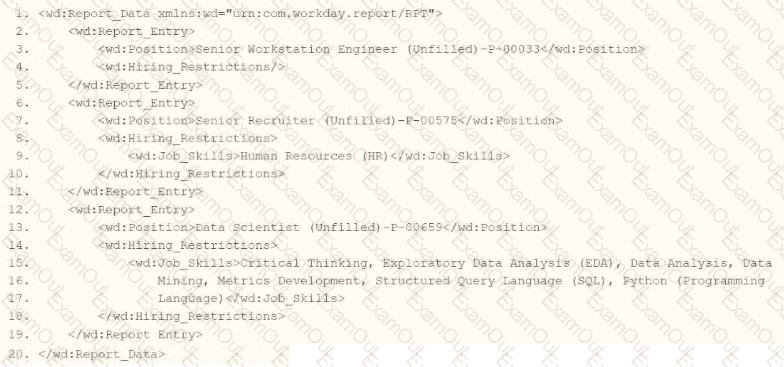
You are an integration developer and need to write X8LT to transform the output of an ElB which is using a web service enabled report to output position data along with hiring restrictions around skills. You currently have a template which matches on wd:Report Data/wd: Report .Entry for creating a record from each report entry.
Within the template which matches on wd:Report_Entry you would like to conditionally process the wd:Job_Skills element by using a series of < xsl:if > elements so as to categorize the job skills data.
Assuming all jobs will have the wd:Job_Skills element, what XSLT syntax would be used to output the text HR Skills if the value of wd:Job_Skills contains the text HR and output NON-HR Skills if the value of wd:Job_Skills does not contain the text HR?
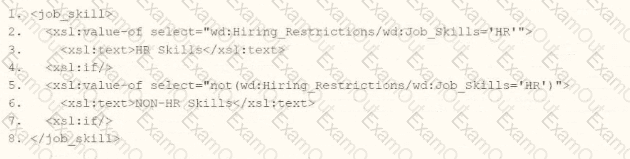

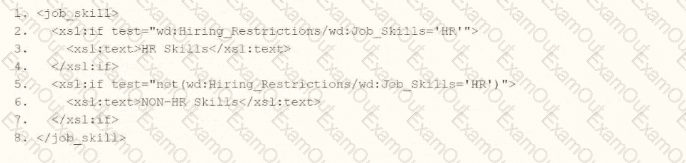
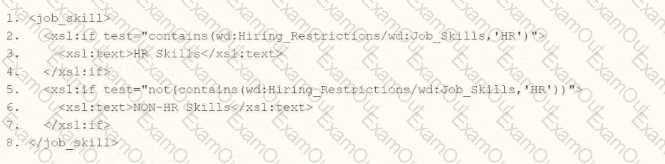
You need to create a report that includes data from multiple business objects. For a supervisory organization specified at run time, the report must output one row per worker, their active benefit plans, and the names and ages of all related dependents. The Worker business object contains the Employee, Benefit Plans, and Dependents fields. The Dependent business object contains the employee ' s dependent ' s Name and Age fields.
How would you select the primary business object (PBO) and related business objects (RBO) for the report?
