Halloween Sale Special - 75% Discount Offer - Ends in 0d 00h 00m 00s - Coupon code: estly75

You have the following dataset in Microsoft Excel.
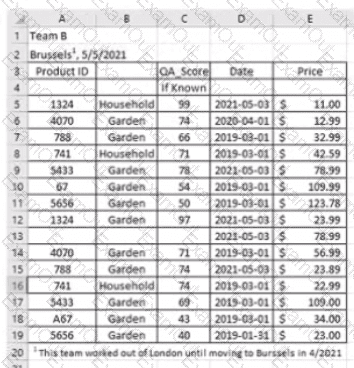
question 31

You are using Data interpreter to cleans the dataset. Data interpreter provides the following results.
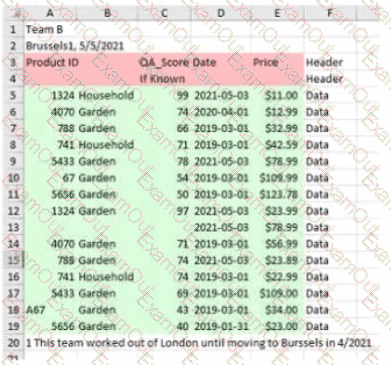
question 31

How many rows of data will be ingested into Tableau as values?

A.

10

B.

20

C.

17

D.

15

A Data Analyst has the following chart that shows the cumulative volume of sales from various dates.
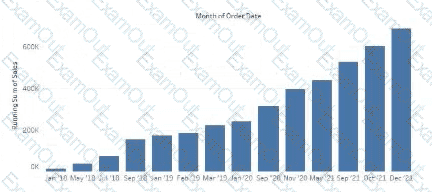
question 32

The analyst wants the months to appear as shown in the following chart.
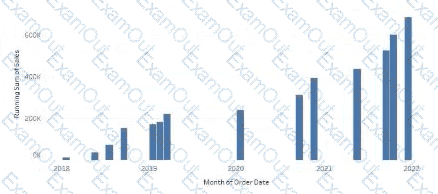
question 32

What should the analyst do?

A.

Convert the date to Exact Date

B.

Change the Sort Order

C.

Convert the date to Continuous

D.

Convert the date to Attribute

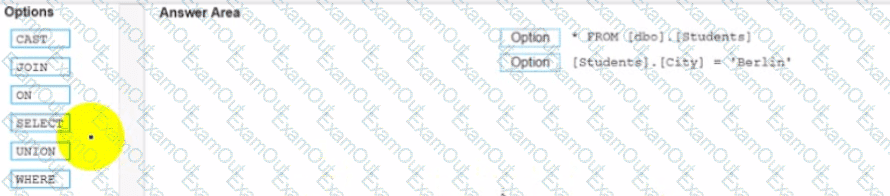
You conned to a Microsoft SQL Server database

You need to create a custom SQL query that retrieves rows from a table named Students Only students m the city of Berlin must be returned

How should you complete the query? (Drag the appropriate Options to the Answer Area and drop into the correct locations.)

question 33

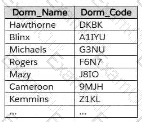
A Data Analyst has the following primary data source that contairis a dimension named Dorm_Code.
question 34

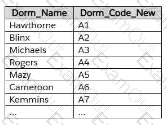
The analyst receives the following secondary data source that contains updated dorm codes.
question 34

The analyst needs to bring the updated dorm codes into Tableau and use the codes in existing visualizations. The new dorm codes must use the existing field name of Dorm_Code.

What should the analyst do?

A.

Bring in the secondary table as a left join to the primary data source. From the Data Source page, select Create Calculated Field in the Dorm_Name field and enter [Dorm_Name_New] in the calculation window.

B.

Create a data blend and select Edit Primary Aliases to replace the primary data source alias values with values from the secondary data source.

C.

Bring in the secondary data source as a union.

D.

Bring in the secondary data source by using relationships. From the Data pane, right-click Dorm_Name, select Replace References, and then select Dorm Name New.

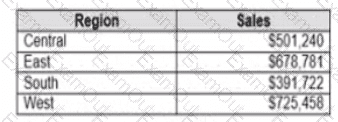
You have the following dataset.

question 35

Which Level of Detail (LOD) expression should you use to calculate tie grand total of all the regions?

A.

{FIXED: [Region] SUM Sales}

B.

{FIXED: SUM Sales}

C.

{Fixed: [Region]: TOTAL Sales}

D.

{FIXED: TOTAL (Sales)}

You are creating an annual report in Microsoft Word.

In Tableau Desktop, you build a chart in a worksheet.

You want to create an image of the chart that you can add to the annual report.

What are two ways to create the image? Choose two.

A.

From the Worksheet menu, use the Export option.

B.

From the Worksheet menu, use the Copy option.

C.

From the File menu, use the Export As Version option.

D.

From the Dashboard menu, use the Export Image option.

E.

From the Dashboard menu, use the Copy Image option.

When using Tableau Desktop to connect to a published data source on Tableau Cloud or Tableau Server, which data sources will be displayed to the user?

A.

Only the data sources the user has created themselves previously

B.

Only certified data sources

C.

Only the data sources the user has the Connect permission to

D.

Only data sources in the user ' s home directory

A Data Analyst would like to receive the draft results of a colleague ' s Tableau Prep flow to start work on a dashboard before it has been published.

What should the analyst do to accomplish this?

A.

On the Tableau Desktop Connect page, under To a File, choose " More ... " , and browse for the colleague ' s .tf file on the local file system.

B.

Have the colleague output the results of the flow to a .hyper file. Create a new workbook in Tableau Cloud, choose Files on the Connect to Data page, and upload the .hyper file from the computer.

C.

Open Tableau Desktop and make a connection to Tableau Prep, then choose the colleague ' s flow that the analyst wants to connect to.

D.

Have the colleague output the results of the flow to a .hyper file. On the Tableau Desktop Connect page, under To a File, choose " More ... " , and browse for the .hyper file on the local file system.

You plan to create a visualization that has a dual axis chart. The dual axis chart will contain a shape chart and a line chart will use the same measure named Population on the axis.

You need to configure be shapes to be much larger than the line.

What should you do?

A.

Duplicate Population Drag the duplicate to the second Marks card and configure the see of the marks independently

B.

Create a custom shape that is larger than the default shape and add the shape to the Shapes folder in My Repository

C.

For the second axis select Shape on the Marks card From Select Shape Palette select Custom and then select Reset

D.

Change Population to a discrete dimension

A Data Analyst needs to update an existing dashboard. The current dashboard shows financial results data, and users have asked for a comparison of budgets to be added to the dashboard. A new data source has been created that includes both the actual costs and budgets and was published to the corporate Tableau site.

How should the analyst update the existing dashboard?

A.

Create a copy of the existing workbook, open it in Tableau Desktop, and connect to the new data source. Update each sheet, using fields from the new data source.

B.

Edit the existing workbook on the Tableau site and connect to the new data source. Blend the new data source with the existing data source.

C.

Create a new workbook in Tableau Desktop and connect to the new data source. Copy and paste all the tabs from the old workbook into the new one.

D.

Edit the existing workbook on the Tableau site and connect to the new data source. From the Data menu, choose Replace Data Source.