Summer Sale Special - Limited Time 70% Discount Offer - Ends in 0d 00h 00m 00s - Coupon code: sntaclus

You want to connect a Tableau workbook to a dataset in a Microsoft Excel spreadsheet.

What should you do from Tableau Desktop?

A.

From the Data menu select New Data Source

B.

From the Data menu select Replace Data Source

C.

From the File menu select Import Workbook

D.

From the File menu select New

You have a database that includes field named sales, City and Region.

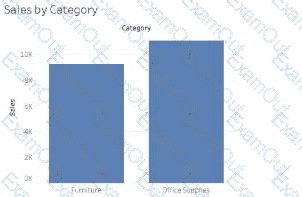
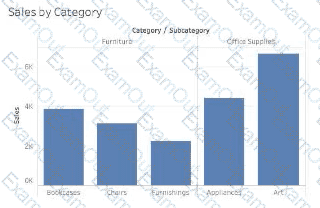
You have the following chart that shows the number of sales made in different cities.

You want to dynamically show the corresponding region when users hover their mouse over any of the bars.

What should you do?

A.

Right-click a in the chat, select Annotate and then select Mark.

B.

Right-click a bar in the chart select Mark Label and then select Always show.

C.

Edit the aliases for City.

D.

Drag Region to Tooltip on the Marks card

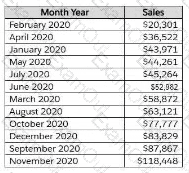
You have the following line chart that shows the average sales by month.
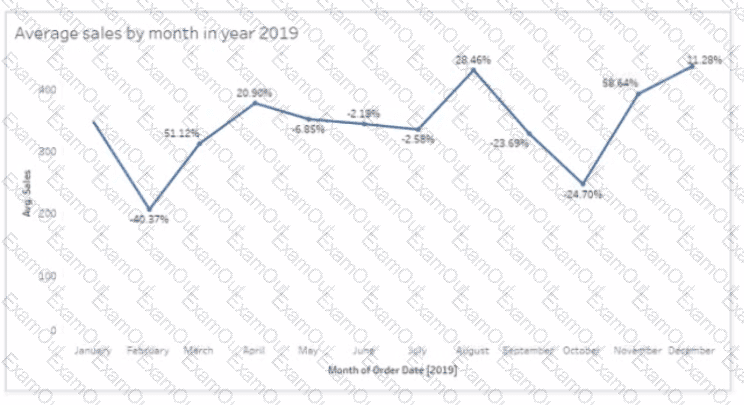
Which month had the biggest increase in swage sales compared to me previous month in 2019?

A.

August

B.

October

C.

December

D.

November

You have the following dataset.

You need to create the following worksheet.

The table must show either profit or sales based on the selection from the Parameter 1 menu.

Which three actions should you perform in orders

(Place the three correct options in order Use the arrows to move Options lo Answer Area Use Answer Area arrows to reorder the options)

You company has two divisions located in the United States and Germany Bach division has a separate database. The following is a sample of the sales data for the division in the United States.

The following is a sample of the sales data for me division in Germany.

You have population data in a file named Populatio.csv. the following is a sample of the data.

You plan to create a visualization that ml show tie sales per capita for each salesperson Each salesperson must be identified by identified by their full name.

You need to prepare the data to support the planned visualization. The data source must support being published .

Which four actions should you perform in order?

(Place the four correct options n order Use the arrows to move Options to Answer Area arrows to re-order the options.

Use Answer Area arrows to re-order the options)

You plan to create a visualization that has a dual axis chart. The dual axis chart will contain a shape chart and a line chart will use the same measure named Population on the axis.

You need to configure be shapes to be much larger than the line.

What should you do?

A.

Duplicate Population Drag the duplicate to the second Marks card and configure the see of the marks independently

B.

Create a custom shape that is larger than the default shape and add the shape to the Shapes folder in My Repository

C.

For the second axis select Shape on the Marks card From Select Shape Palette select Custom and then select Reset

D.

Change Population to a discrete dimension

You have the following dataset.

Yon need to calculate the ranking shown in the Rank field.

How should you complete the formula? (Use the dropdowns in the Answer Area to select the correct options to complete the formula ?

A colleague provides you with access to a folder that contains the following files:

• Sates.csv

• Bookl.twb

• Sates.hyper

• Export.mdb

Which He contains an extract?

A.

Export mdb

B.

Book1.twb

C.

Sales.hyper

D.

Sales.csv

You have two tables named Employeelnfo and DepartmentInfo. Employeelnfo contains four fields named Full Name, Department ID, Start Date, and Salary.

DepartmentInfo contains four fields named Department Name, Size, Department ID, and VP.

You want to combine the tables to meet the following requirements:

. Each record in Employeelnfo must be retained in the combined table.

. The records must contain the Department Name, Size, and VP fields.

· Every record must have a full name.

Which type of join should you use?

A.

Inner

B.

Left

C.

Full outer

D.

Union

You have a data source that contains the following columns.

You want to sort customers based on the most expensive orders.

How should you complete the formula? (Use the dropdowns in the Answer Area to select the correct options to complete the formula.)