
Refer to the exhibits.
The DOS attack playbook is configured to create an incident when an event handler generates a denial-of-ser/ice (DoS) attack event.
Why did the DOS attack playbook fail to execute?
Which FortiAnalyzer feature uses the SIEM database for advance log analytics and monitoring?
Refer to the Exhibit:
An analyst wants to create an incident and generate a report whenever FortiAnalyzer generates a malicious attachment event based on FortiSandbox analysis. The endpoint hosts are protected by FortiClient EMS integrated with FortiSandbox. All devices are logging to FortiAnalyzer.
Which connector must the analyst use in this playbook?
Refer to Exhibits:
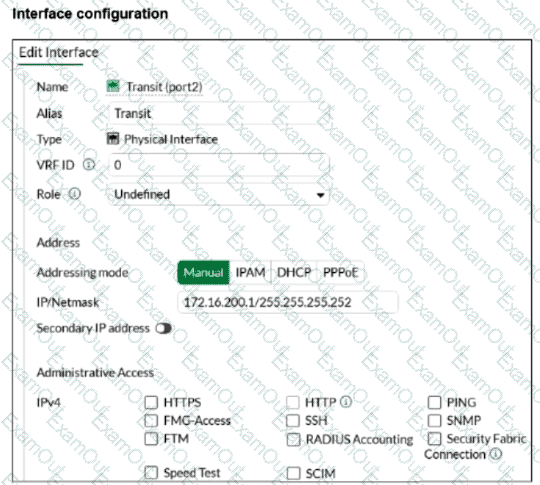
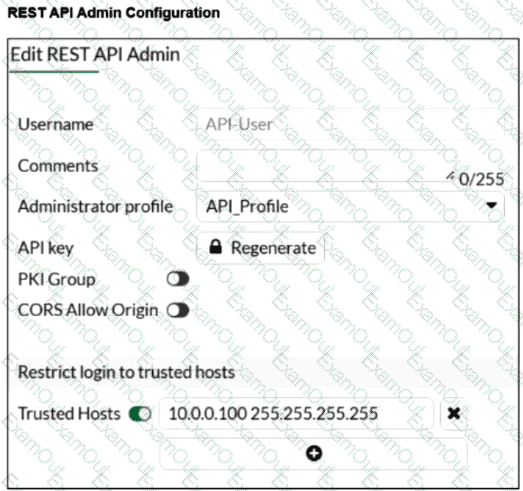
You configured the FortiGate connector on FortiSOAR. You want to allow FortiSOAR 10.200.200.160 to perform actions on FortiGate 172.16.200.1. However, the connection attempt fails. Assume that the FortiGate connector is configured correctly on the FortiSOAR side.
Which two configurations are required on FortiGate? Choose two answers.
Refer to the exhibit.
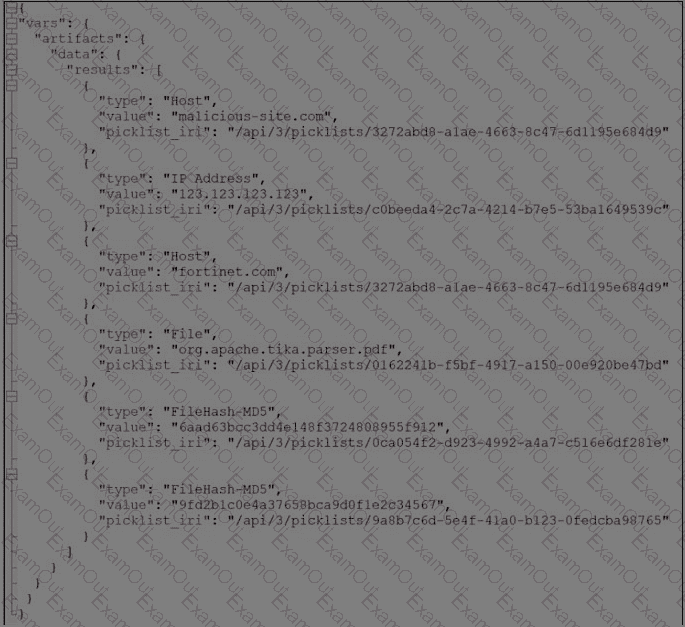
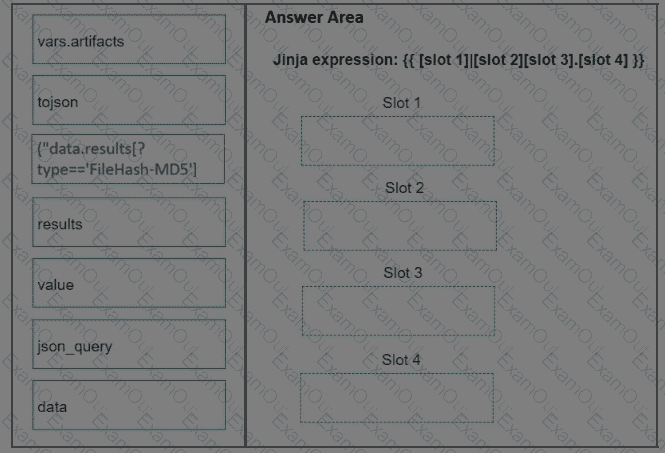
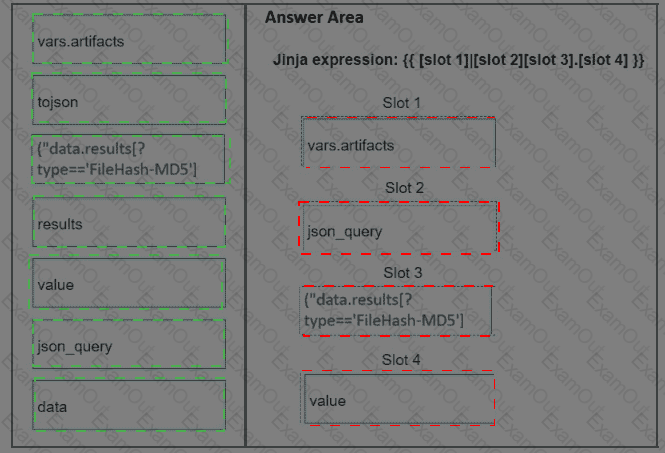
What is the correct Jinja expression to filter the results to show only the MD5 hash values?
{{ [slot 1]|[slot 2] [slot 3].[slot 4] }}
Select the jinja expression in the left column, hold and drag it to a blank position on the right. Place the four correct steps in order, placing the first
step in the first slot. Once you place an expression, you can move it again if you want to change your answer before moving to the next question. You
need to drop four jinja expressions in the work area.
Select and drag the screen divider to change the viewable area of the source and work areas.
Refer to Exhibit:
A SOC analyst is designing a playbook to filter for a high severity event and attach the event information to an incident.
Which local connector action must the analyst use in this scenario?
Refer to this partial incident output:
Condition: if this pattern occurs within any 1800-second time window.
Host Interface Name: Red Hat VirtIO Ethernet Adapter
Recv Packet Errors: 0
Sent Packet Errors: 0
Recv Packet Discards: 37
Sent Packet Discards: 0
Recv Packet Error Pct: 0.00
Sent Packet Error Pct: 0.00
Recv Packet Discard Pct: 7.17
Sent Packet Discard Pct: 0.00
Avg Recv Interface Error: 0.00
Avg Sent Interface Error: 0.00
Avg Recv Interface Discard: 16.45
Avg Sent Interface Discard: 0.00
Which conclusion can you make about this incident? Choose one answer.
Refer to the exhibits.
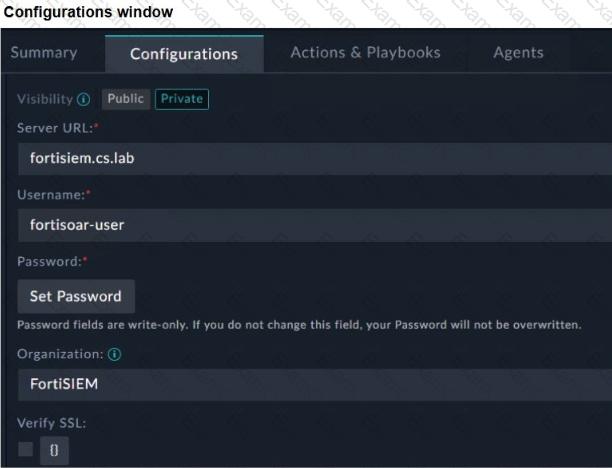
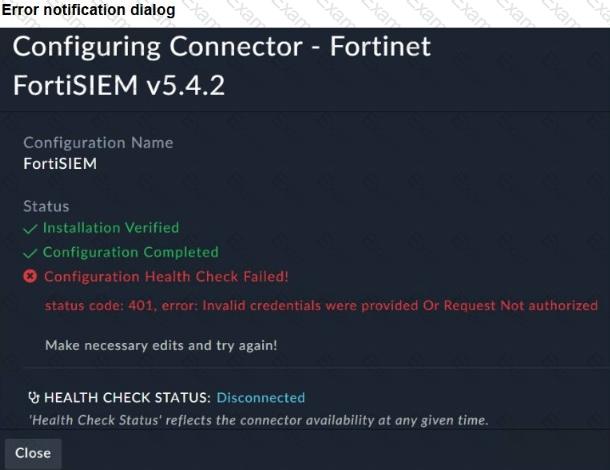
You configured the FortiSIEM connector on FortiSOAR. However, when you try to save the configuration, you see the error shown in the exhibit. What are two possible causes? Choose two answers.
Refer to the exhibits.
You configured a spearphishing event handler and the associated rule. However. FortiAnalyzer did not generate an event.
When you check the FortiAnalyzer log viewer, you confirm that FortiSandbox forwarded the appropriate logs, as shown in the raw log exhibit.
What configuration must you change on FortiAnalyzer in order for FortiAnalyzer to generate an event?
You are trying to create a playbook that creates a manual task showing a list of public IPv6 addresses. You were successful in extracting all IP addresses from a previous action into a variable called ip_list, which contains both private and public IPv4 and IPv6 addresses. You must now filter the results to display only public IPv6 addresses. Which two Jinja expressions can accomplish this task? (Choose two answers)
