Cyber Monday Sale Special - Limited Time 70% Discount Offer - Ends in 0d 00h 00m 00s - Coupon code: sntaclus

You are assigned to develop a set of activities by using a popular HR application. The application loads automatically after you start interrogation from Pega Robot Studio, but you notice that you are unable to use the bullseye on the Robot Studio Interrogation Form to drag and drop over the desired controls.

Why are you unable to interrogate the desired application controls?

A.

The StartMethod on the application is set to StartAndWait, but the TargetPath property is undefined.

B.

The StartOnProject property of the application is set to false.

C.

The StartMethod on the application is set to Start, but the TargetPath property is undefined.

D.

The StartMethod on the application is set to MonitorAll, but the Path property is undefined.

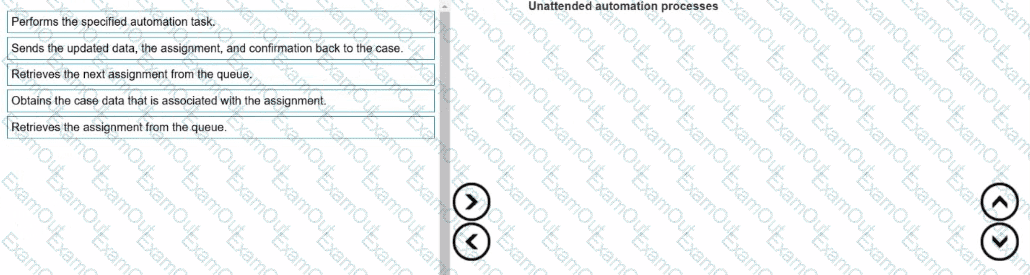
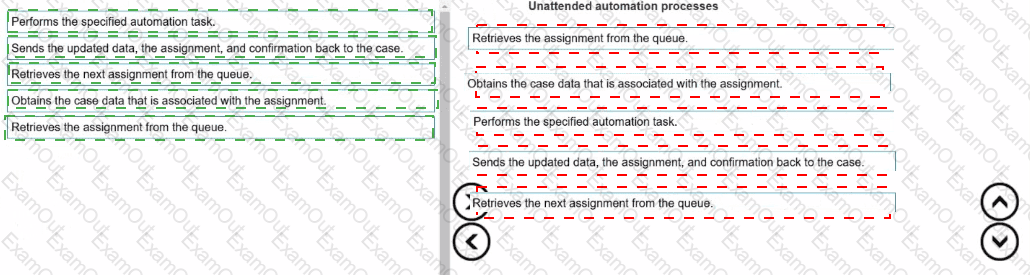
Unattended automations, when run. follow a basic process flow. Arrange the following steps in the order in which unattended automation topic processes a case.
A solution design document outlines several projects for the solution. You are assigned to the Loan Servicing project (LoanSvcPrj). The project uses the Interaction Framework function to communicate with the other projects.

Which three toolbox project items do you add to LoanSvcPrj? (Choose three.)

A.

Message Manifest

B.

Interaction.xml

C.

Interaction Manager

D.

Activity

E.

String Variable

You interrogated a page using Create Global Web Page with the title:

Customer: B Norton| Financial ABC Application

During debugging of an automation using the interrogated web page, you ran the first test using the account B Norton. On the second test, you used S Whitfield. The second debugging failed. After checking the matching of the controls, you recognize the issue.

How do you correct the matching issue?

A.

Modify the Window Text Match Rule.

B.

Modify the Document Title Match Rule.

C.

Modify the Document URL Match Rule.

D.

Reinterrogate the control using Replace Control on the Interrogation Form.

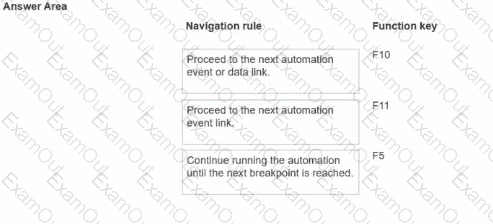
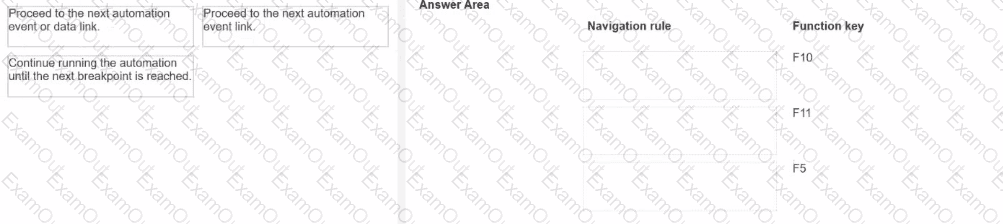
When you debug an automation, you have three function keys to use for navigating the breakpoints. Drag each navigation rule on the left to the box next to the correct function key on the right.
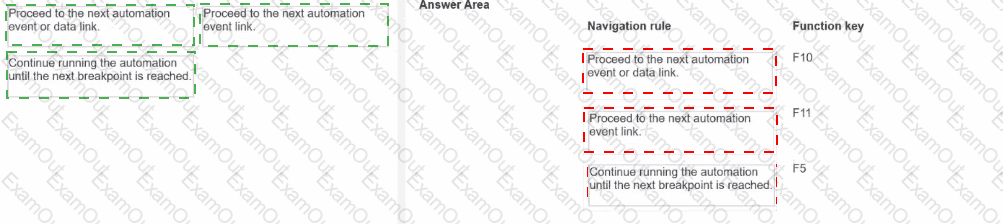
In a Java application, you click a button to load a grid. The grid loads as a separate process under the Java application.

Which property allows you to interrogate the grid?

A.

HookChildProcesses

B.

EnableMatchInProcess

C.

TargetPath

D.

IgnoreMainBrowser

Which responsible for sending the deployment package to the customer. You want to build your project to work with the test and production Human Resource (HR) systems........ 1 have different access points for the HR applications,

How can you design a single project to work in both systems?

A.

Create one environment override for the HR System project; the override contains both the production and test details.

B.

Add two applications for the HR Project: one application for production, and one application for test.

C.

Add two environment overrides and two applications for the HR project: one override and application for production, and the other override and application for test.

D.

Create two environment overrides for the HR System project: one override for production, and one for test.

You are designing an attended project for a banking customer. This project requires you to add new customers from an application to a combo box in a custom user surface.

Which steps do you take to gain access to the methods of the combo box items within an automation?

A.

Drag the combo box to the automation surface to open the Select action dialog box, and then filter for the method that you want to access.

B.

Open the Globals tab, filter for the method that you want to access, and then drag the method to the design surface.

C.

Select the combo box in a design form of the user interface to open the Select action window.

D.

Select the combo box in the Palette tab of an automation, and then filter for the method that you want to access in the properties grid.

Which two statements are valid for the given automation? (Choose two.)

A.

The automation is initiated when the value of the NearestStore changes.

B.

Assign Main|b|NearestStore with the new value only if the value changed belongs to an active key.

C.

Assign Main|b|NearestStore with the new value when the value of the NearestStore changes.

D.

The value of the NearestStore changes when the automation is initiated.

Which step allows you to add a Watch to an automation variable?

A.

Right-click the execution link (yellow execution line) coming from the variable, and select Add Watch.

B.

Right-click the data link (blue propagate line) coming from the variable, and select Add Watch.

C.

Right-click the incoming/outgoing execution port (yellow dot) of the variable, and select Add Watch.

D.

Right-click the input/output data port (blue dot) of the variable, and select Add Watch.