Note: This question is part of a series of questions that present the same scenario. Each question in the series contains a unique solution that might meet the stated goals. Some question setsmight have more than one correct solution, while others might not have a correct solution.
After you answer a question in this section, you will NOT be able to return to it as a result, these questions will not appear in the review screen.
You have an Amazon Web Services (AWS) account, a Google Workspace subscription, and a GitHub account.
You deploy an Azure subscription and enable Microsoft 365 Defender.
You need to ensure that you can monitor OAuth authentication requests by using Microsoft Defender for Cloud Apps.
Solution: From the Microsoft 365 Defender portal, you add the Google Workspace app connector.
Does this meet the goal?
You have an Azure Active Directory (Azure AD) tenant that contains the following objects:
A device named Device1
Users named User1, User2, User3, User4, and User5
Groups named Group1, Group2, Group3, Group4, and Group5
The groups are configured as shown in the following table.

To which groups can you assign a Microsoft Office 365 Enterprise E5 license directly?
You have an Azure Active Directory (Azure AD) tenant named contoso.com that contains an Azure AD enterprise application named App1.
A contractor uses the credentials of user1@outlook.com.
You need to ensure that you can provide the contractor with access to App1. The contractor must be able to authenticate as user1@outlook.com.
What should you do?
You have an Azure subscription, a Google Cloud Platform (GCP) account, and an Amazon Web Services (AWS) account.
You need to recommend a solution to assess the risks associated with privilege assignments across all the platforms. The solution must minimize administrative effort
What should you include in the recommendation?
You need to implement the planned changes for Package1. Which users can create and manage the access review?
You need to resolve the issue of the guest user invitations. What should you do for the Azure AD tenant?
You need to resolve the issue of the sales department users. What should you configure for the Azure AD tenant?
You implement the planned changes for SSPR.
What occurs when User3 attempts to use SSPR? To answer, select the appropriate options in the answer area.
NOTE: Each correct selection is worth one point.


You need to modify the settings of the User administrator role to meet the technical requirements. Which two actions should you perform for the role? Each correct answer presents part of the solution. NOTE: Each correct selection is worth one point.
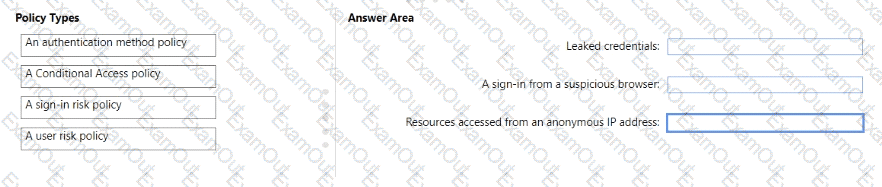
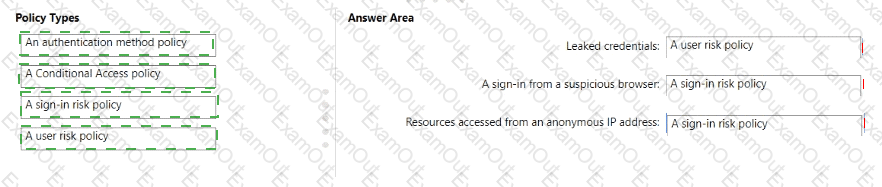
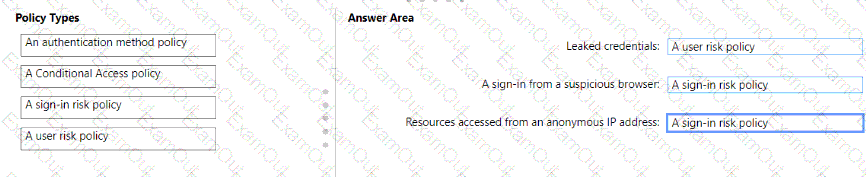
You need to resolve the recent security incident issues.
What should you configure for each incident? To answer, drag the appropriate policy types to the correct issues. Each policy type may be used once, more than once, or not at all. You may need to drag the split bar between panes or scroll to view content.
NOTE: Each correct selection is worth one point.