Note: This question is part of a series of questions that present the same scenario. Each question in the series contains a unique solution that might meet the stated goals. Some question sets might have more than one correct solution, while others might not have a correct solution.
Aft er you answer a question in this section, you will NOT be able to return to it. As a result, these questions will not appear in the review screen.
You are configuring Microsoft Defender for Identity integration with Active Directory.
From the Microsoft D efender for identity portal, you need to configure several accounts for attackers to exploit.
Solution: You add the accounts to an Active Directory group and add the group as a Sensitive group.
Does this meet the goal?
Note: This question is part of a series of questions that present the same scenario. Each question in the series con tains a unique solution that might meet the stated goals. Some question sets might have more than one correct solution, while others might not have a correct solution.
After you answer a question in this section, you will NOT be able to return to it. As a result, these questions will not appear in the review screen.
You are configuring Microsoft Defender for Identity integration with Active Directory.
From the Microsoft Defender for identity portal, you need to configure several accounts for attackers to exploit.
Solution: From Entity tags, you add the accounts as Honeytoken accounts.
Does this meet the goal?
You have a Microsoft 365 subscription that uses Microsoft Defender for Endpoint Plan 1 and contains a macOS device named Device1.
You need to investigate a Defender for Endpoint agent alert on Device1. The solution must meet the following requirements:
• Identify all the active network connections on Device1.
• Identify all the running processes on Device1.
• Retrieve the login history of Device1.
• Minimize administrative effort.
What should you do first from the Microsoft Defender portal?
You have a Microsoft 365 E5 subscription and a Microsoft Sentinel workspace. You need to create a KQL query that will combine data from the following sources:
• Microsoft Graph
• Risky users detected by using Microsoft Entra ID Protection
The solution must minimize the volume of data returned. How should the query start?
Your on-premises network contains two Active Directory Domain Services (AD DS) domains named contoso.com and fabrikam.com. Contoso.com contains a group named Group1. Fabrikam.com contains a group named Group2.
You have a Microsoft Sentinel workspace named WS1 that contains a scheduled query rule named Rule1. Rule1 generates alerts in response to anomalous AD DS security events. Each alert creates an incident.
You need to implement an incident triage solution that meets the following requirements:
· Security incidents from contoso.com must be assigned to Group1.
· Security incidents from fabrikam.com must be assigned to Group2.
· Administrative effort must be minimized.
What should you include in the solution?
You need to complete the query for failed sign-ins to meet the technical requirements.
Where can you find the column name to complete the where clause?
You need to recommend a solution to meet the technical requirements for the Azure virtual machines. What should you include in the recommendation?
You need to ensure that the Group1 members can meet the Microsoft Sentinel requirements.
Which role should you assign to Group1?
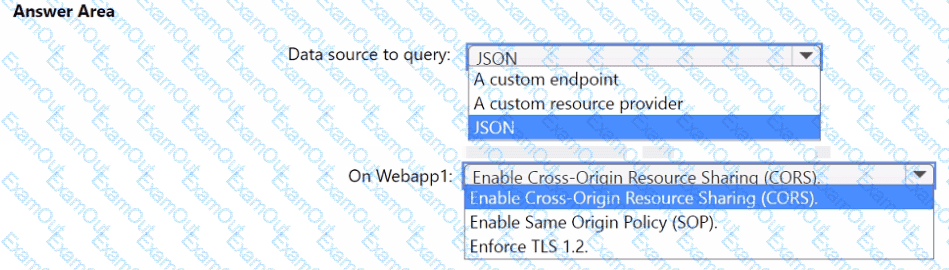
You need to implement the query for Workbook1 and Webapp1. The solution must meet the Microsoft Sentinel requirements. How should you configure the query? To answer, select the appropriate options in the answer area. NOTE: Each correct selection is worth one point.


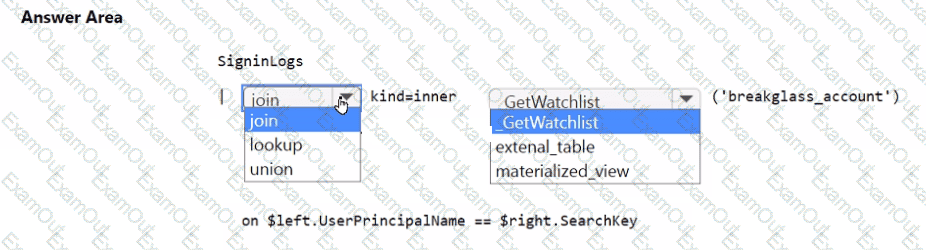
You need to implement the Microsoft Sentinel NRT rule for monitoring the designated break glass account. The solution must meet the Microsoft Sentinel requirements.
How should you complete the query? To answer, select the appropriate options in the answer area.
NOTE: Each correct selection is worth one point.