
A technician installed a new HPE Aruba Networking 580EX Series access point, which is cabled back to an HPE Aruba Networking CX 6000 48G 4SFP switch. However, there are no lights on the access point.
What could cause this issue?
Which is an example of half-duplex communication?
A four-member HPE Aruba Networking CX 6200F VSF configuration is planned to replace the current 5412R switch. The customer has an open-source network management solution.
How should you respond to their question about monitoring the switches securely?
When multiple routes exist to the same destination, which would be installed in the routing table?
You have configured the following on a Core-1 HPE Aruba Networking CX switch for primary and secondary ISP connectivity:
Core-1(config)# ip route 0.0.0.0/0 10.1.251.2
Core-1(config)# ip route 0.0.0.0/0 10.1.252.2 distance 10
The default route via 10.1.251.2 stopped working, and no failover happened. The ISP reported a broken fiber on the path of an upstream device.
In what condition should the route fail over to the 10.1.252.2 router?
You are trying to configure VSF on a pair of HPE Aruba Networking CX 8100 Series switches. What would cause the following error?
Switch-1(config)# vsf member 2
Invalid input: vsf
Switch-1(config)#
You are discussing the central management options for HPE Aruba Networking CX switches with a customer.
How would you describe HPE Aruba Networking Central as a solution?
Which statement correctly describes the factory default on an HPE Aruba Networking CX switch?
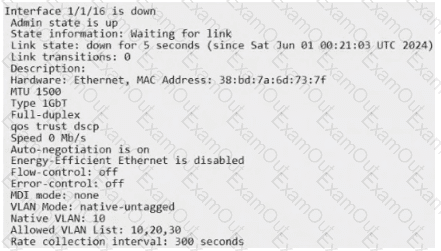
You are checking the interface details for an access point that cannot reach HPE Aruba Networking Central. After reviewing the following output, which statement is true?
Interface 1/1/16 is down
Admin state is up
State information: Waiting for link
Link state: down for 5 seconds
Link transitions: 0
Description:
Hardware: Ethernet, MAC Address: 38:bd:7a:6d:73:7f
MTU 1500
Type 1GbT
Full-duplex
qos trust dscp
Speed 0 Mb/s
Auto-negotiation is on
Energy-Efficient Ethernet is disabled
Flow-control: off
Error-control: off
MDI mode: none
VLAN Mode: native-untagged
Native VLAN: 10
Allowed VLAN List: 10,20,30
Rate collection interval: 300 seconds
A Windows PC is not able to browse the Internet. Based on the output, what could be the problem?
Windows IP Configuration
Ethernet adapter Ethernet:
Connection-specific DNS Suffix : arubatraining.com
IPv4 Address : 10.211.55.151
Subnet Mask : 255.255.255.0
Default Gateway : 10.211.55.1
Access-1# show run int vlan 55
interface vlan 55
description Workstations
ip address 10.211.55.1/25
Access-1# show run int 1/1/12
interface 1/1/12
no shutdown
description PC
vlan access 55
spanning-tree port-type admin-edge
exit
